
Find the answer to your questions, whether you're a company, an employee or a merchant!
How can we help you?
What can I buy with my gift vouchers?
Gift vouchers can be used at our affiliated stores in Luxembourg. Gift vouchers in Luxembourg are not subject to any spending limits or specific sectors. Treat yourself: high-tech, fashion, chocolate, DIY, leisure, there's something for everyone!
How do I block my card?
In case of loss, you can temporarily suspend your card via the App Pluxee:
1. Select "WALLET" at the bottom of the screen
2. Go to Settings in the top left corner of the screen and click on "Temporarily suspend this card".
3. If the card was only temporarily lost and you find it, you can reactivate it. The button will now appear as "Unsuspend this card".
To definitely block your card in case of theft or loss, you should contact our consumer service by email at consumers.lu@pluxeegroup.com or by calling us at 00352 28 76 15 00 from Monday to Friday from 9am to 5.30pm. Please give us your Pluxee ID & Card ID.
Will your Pluxee card expire soon? See whether you will receive a new card automatically.
What does the Pluxee Gift card look like and how does it work?
This is what the Pluxee Gift card looks like:
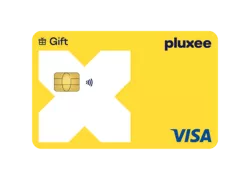
It is a VISA DEBIT card that works like a classic VISA card: it has a chip for contactless payments and also allows secure online payment.
The card only works in Luxembourg, at affiliated points of sale.
How long are Pluxee gift vouchers valid for?
Pluxee gift vouchers are valid for 12 months from the date they are loaded. Three months before they expire, you will receive an email and app notification informing you of their expiry date, giving you time to use them at our partner merchants.
See where you can use your Pluxee electronic gift vouchers in Luxembourg.
What is Apple Pay?
Apple Pay is a mobile payment solution. You can pay contactless in a store or restaurant with your iPhone or Apple Watch via NFC.
All you have to do is hold your iPhone or Apple Watch in front of the contactless reader, follow instructions on the payment terminal.
What should I choose between a physical or virtual Pluxee card for my employees?
The choice between the physical Pluxee card and the virtual card depends on your employees' needs and preferences regarding their use of lunch and gift vouchers.
Physical Pluxee card
- Versatility: Can be used just like a traditional bank card, with contactless and mobile payment functions.
- Ease of use: Ideal for those who prefer a physical card they can slip into their wallet.
- Accessibility: Suitable for everyone, including employees unfamiliar with mobile payments.
Virtual Pluxee card
- 100% virtual: Perfect for smartphone users looking for a modern, paperless solution.
- Fast mobile payments: Compatible with Apple Pay and Google Pay for seamless payments.
- Environmentally-friendly: A more sustainable, plastic-free option.
- Enhanced security: Protected by mobile wallet security systems (fingerprint, facial recognition, etc.).
Which option is the right one?
For maximum flexibility, you can even offer both solutions to meet the varied expectations of your employees. Those who appreciate a more traditional approach will opt for the physical card, while digital enthusiasts will prefer the virtual card for its modernity and practicality. Our local team is here to advise you.
My Pluxee card will soon expire. Will I receive a new card automatically?
Yes, your Pluxee card will be renewed automatically, as long as your employer has confirmed that you are still part of the company. This renewal is carried out one month before your card expires, and you will be informed by e-mail.
As soon as the new card is ordered, it immediately replaces the old one in the Pluxee application. It will be sent within 10 to 15 working days to your employer's address. Please do not click on “Activate” in the application until you have your new card in hand, so that you can continue to use your current card and avoid any risks.
And yes, the balance on your Pluxee card will be automatically transferred to your new card when it is renewed.
Our local team will support you throughout the process and will be happy to answer any questions you may have. You can contact us by e-mail at consumers.lu@pluxeegroup.com or by telephone on +352 2876 1500.
Pluxee Lunch card not working? Check the most common reasons for a declined payment.
Will my balance be automatically transferred to my new card?
Yes, the balance on your Pluxee card will be automatically transferred to your new card when it is renewed. You don't have to do a thing: as soon as your new card is activated, the amount remaining on your old card will be available immediately.
This process is completely secure, and guarantees that you won't lose any credit when you switch from one card to another.
Where can I see my balance after each purchase transaction?
Your balance is updated after each purchase transaction. You can consult it on the mobile application Pluxee as soon as you log in on the home page or on "WALLET".
The balance and the transaction history can also be consulted on the Consumers Page.
How do I know when my Pluxee credits are due to expire?
Electronic vouchers are valid for 12 months from the date of loading. Our “First in - First out” system ensures that the oldest credits are used first.
Expiring amounts will be displayed on the Pluxee app and Consumers Page 3 months before the expiry date.
Where can I change my details?
Your personal information can be edited from the Pluxee app or Consumers Page.
After selecting your profile, go to “Personal Information” (or “My Account” on the web portal). You will then be redirected to Pluxee Connect, where you can manage your data, such as your personal information (profile, phone number, email address, etc.) and your account security settings (password, biometrics, etc.).
You can also delete your Pluxee Connect account (which will result in the loss of your access).
Where can I see my transactions?
You can access this information whenever you need to, in real time, by logging in to your account in the app Pluxee via "WALLET". A 3 months history of transactions will be displayed. You can search and filter transactions by type and period.
This is also available on the Consumers Page.
How do I pay online with my Pluxee card?
Our digital lunch vouchers (Pluxee Lunch) and gift vouchers (Pluxee Gift) can be used online, just like credit cards. For example, you can use your digital lunch vouchers on delivery platforms such as Wolt, Wedely, or Foozo.
To pay online, find your card details (card number, expiration date, and CVV), whether physical or virtual, in the Pluxee app. Go to your card settings via the “Display my card's PAN and CVV” option.
When paying, simply enter your card details as you would for a standard credit card payment.
Note: to use your card online, you may receive an SMS to validate the transaction. It is essential that the phone number entered in your Pluxee profile is correct. It can be changed at any time in the Pluxee mobile app.
How do I install the Pluxee app?
The Pluxee app is available on the App Store and Play Store. Download the Pluxee app, or search for “Pluxee” by Pluxee International in the App Store for iOS or Play Store for Android.
Once you have downloaded the app, select ‘Luxembourg’ as your employer's country and create your account or log in.
How do I know when my card has been reloaded?
When your employer reloads your card (lunch voucher or gift voucher), you will receive a notification at your email address and in the Pluxee mobile app (if you have agreed to receive our notifications). The balance is updated immediately and automatically in the app. Loadings are always carried out outside of weekends and public holidays.
Where can I find my Pluxee card number and CVV?
You can find your Pluxee card number and CVV in the Pluxee app:
1. Open the Pluxee app and select your card.
2. Go to Settings.
3. Select “Display my card PAN and CVV.”
The PAN is your Pluxee card number. You can copy it when needed, for example for an online payment.
Do I need to take any action to renew my employees' cards?
Three months before your employees' cards are due to expire, you will receive an e-mail inviting you to select the cards that should not be renewed (e.g. employees who have left the company). You can make this selection directly via your online customer area, or by returning an Excel file pre-filled with the list of cards not to be renewed.
If you do not take this action, all cards will be automatically renewed.
Rest assured that we'll be with you every step of the way, giving you ample advance notice. Information is sent several weeks before expiration to give you time to take the necessary steps, and our team is available to answer any questions you may have via orders.lu@pluxeegroup.com or +352 2876 1500.
How do I replace my Card?
If your card is permanently lost, if it has been stolen, or if it is damaged and unusable or if you have never received your card, please contact our consumer service (by e-mail on consumers.lu@pluxeegroup.com or by phone on 00352 28 76 15 00 from Monday to Friday from 9am to 5.30pm.) to block it and a new card will be ordered automatically and will be sent to you. Please give us your Pluxee ID.
See when your Pluxee credits are due to expire and how to check their expiry date.
Need to add funds to your card? Learn how your Pluxee Lunch card is reloaded and who is responsible for the top-up.
Where can I find my Pluxee ID?
When creating your account, you will need to provide your Pluxee ID:
- If you have a physical card, you'll find it in the email you got when your card was loaded.
- If you have a virtual card, your Pluxee ID can be found in the e-mail you received after creating your card, entitled “Pluxee Virtual Card: Your Pluxee ID”.
If you have already created your account, you can find your Pluxee ID in your Pluxee application :
- Go to the "cards" tab
- Select your card
- Click on the "settings" icon on the top right of your screen
- Chose "Display card ID" and copy your ID to your clipboard
Waiting for a replacement card? Check if your old Pluxee card still works.
Where can I find my CARD ID?
You will need to provide your Card ID when creating your account and for each exchange with the Pluxee team.
- If you have a physical card: the CARD ID is written on the back of your card and begins with LUX.
- If you have a virtual card: in the PDF document attached to the e-mail entitled “Pluxee virtual card: your Card ID” received when finalizing the creation of your virtual card.
To create your account on the Pluxee mobile application, you only need to enter the last 8 digits.
Need help locating your account details? Learn where to find your Pluxee ID in the app or Pluxee consumer portal.