
Find the answer to your questions, whether you're a company, an employee or a merchant!
How can we help you?
How do I submit a voucher for reimbursement?
Remember to stamp your vouchers with your company stamp in the space provided on the back of the vouchers before sending them to us for reimbursement.
You can obtain a reimbursement:
- in person from the Pluxee office at 25 Rue du Puits Romain, Bertrange, between the hours of 8:30am-12pm and 1:30pm-4pm
- send your vouchers to us by carrier (Brinks, G4S, DPD, TNT, etc.)
- or by post, although this option involves greater risk (should the package get lost or stolen, for example).
What are the advantages for me to accept the card compared to paper vouchers?
The card has many advantages for the merchant:
- Speed at checkout: using the card for the payment greatly reduces the time spent at the checkout since it is no longer necessary to count or stamp checks; nor to give change since the transaction takes place to the penny.
- Security: there is no longer any risk of loss or theft of paper vouchers that may occur during storage or when sending to Pluxee.
- Efficiency and management: there is no longer any risk of accepting expired vouchers or counting errors, nor is it necessary to provide a secure room to store the vouchers, nor any costs for sending the checks at Pluxee.
How long does it take to receive the transaction amount?
Unlike paper vouchers, Pluxee is not responsible for refunding your transactions when they take place with the card.
The refund is made by your payment service provider (SIX, Worldline, ServiPay, BSPayone, etc.) and the speed of the refund depends on the terms agreed with the latter.
How do I obtain a window sticker?
Should you wish to obtain a sticker for the window of your business to show that you accept Pluxee products you can:
- come in person to the Pluxee office at 25 Rue du Puits Romain, Bertrange, between the hours of 8:30am-12pm and 1:30pm-4pm
- call the affiliation department on 28 76 15 00
- send an e-mail to request a window sticker at merchants.lu@pluxeegroup.com.
How will Pluxee deduct its commission?
Unlike paper vouchers, Pluxee is not responsible for refunding your transactions when they take place with the card. Pluxee is never in possession of the amount of the transactions.
Pluxee's commission will therefore be invoiced completely independently, according to the terms and conditions agreed with Pluxee.
Do I have to make technical modifications on my payment terminal?
There is no technical modification to do on your terminal.
The Pluxee cards are VISA cards that work like all other VISA cards.
However, your Merchant ID must be authorized in our systems. This number can be retrieved from your acquirer and Pluxee can guide you in this recovery.
Do I have to sign a contract for each point of sale?
A contract/amendment should only be signed when a different legal entity is engaged (i.e. a different VAT or RCS number).
Thus, if several points of sale are all associated with the same legal entity (same VAT number), it will only be necessary to sign a single contract.
If, on the other hand, each of your points of sale is registered in the commercial register with a different RCS or VAT number, you will have to sign as many contracts as there are legal entities.
Which payment service providers are able to accept the Pluxee card?
To date, most known acquirers in Luxembourg are able to accept our Pluxee card:
- Adyen
- Axepta
- Done4You
- Elavon
- Fiserv
- Keyware/Paynovate
- Marketpay
- Nayax
- Revolut
- Servipay
- Sumup
- Stripe
- Unzer
- Vivawallet
- Wallee
- Worldline(Six/Cetrel/Saferpay)
In doubt? Our dedicated team is at your disposal: merchants.lu@pluxeegroup.com
How do I become a Pluxee Lunch vouchers affiliate?
As of February 28, 2025, paper lunch vouchers are no longer circulating in Luxembourg. It is therefore no longer possible to join the Pluxee Lunch paper network. However, you can join the Pluxee Lunch (and Gift) card network by filling this form.
How do I become an affiliate Pluxee Gift paper vouchers?
To join our network, simply complete our affiliation form, our local team will then contact you.
How to join the Pluxee Lunch card acceptance network?
To become an affiliate, there are 3 simple steps:
- Registration: You provide the necessary information for the preparation of your contract, for instance you fill in our online affiliation form.
- Signature of the contract: You sign the contract.
- Activation: We activate your Points of Sale remotely, without any manipulation on your part. We add your Points of Sale to the Store Locator of our App.
How can I get a voucher remittance form?
You can obtain a voucher remittance form in person from the Pluxee members’ desk at 39 Rue du Puits Romain, Bertrange, between the hours of 8:30am-12pm and 1:30pm-4pm, by calling the affiliation department on 28 76 15 00 or by downloading it from our website.
How long does it take to activate my devices?
From the moment we receive your signed contracts, activation generally takes less than 24 hours.
This of course depends on the number of points of sale to be activated.
Learn how to activate your Pluxee card in a few simple steps.
What does the Pluxee Gift card look like and how does it work?
This is what the Pluxee Gift card looks like:
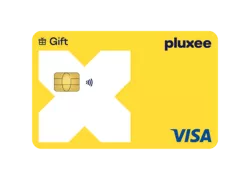
It is a VISA DEBIT card that works like a classic VISA card: it has a chip for contactless payments and also allows secure online payment.
The card only works in Luxembourg, at affiliated points of sale.
What does the card look like and how does it work?
This is what the Pluxee Lunch card looks like:
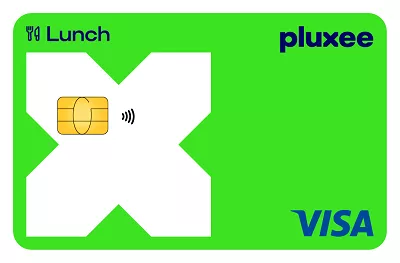
For the moment we have still some valid Sodexo cards on the market, you can continue to accept them as well:
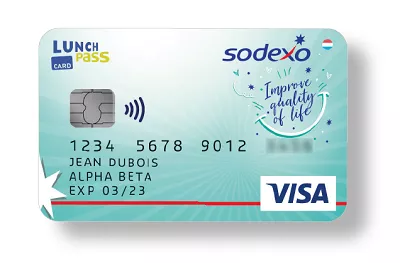
It is a VISA DEBIT card that works like a classic VISA card: it has a chip for contactless payments and also allows secure online payment.
The card only works in Luxembourg, at affiliated points of sale.
Can I accept the Pluxee Lunch card on my online store?
Yes.
As the Pluxee Lunch card is a VISA card, it offers the same technical features as a classic VISA card with regard to online payments.
All we need to do is retrieve the merchant ID linked to your online store and add it to our systems for online payments to be activated.
See how to pay online with the Pluxee card.
What types of merchants can accept the Pluxee Lunch card?
Restaurants, pizzerias, fast foods, pastries and all shops whose main activity is the supply of ready-to-eat food equipped with a POS and having an agreement with Pluxee for the acceptance of the Pluxee Lunch card.
Use our Pluxee merchant finder in Luxembourg to locate participating restaurants, supermarkets and other nearby merchants that accept the Pluxee Lunch card.
How will I collect the amount of the transactions?
Unlike paper vouchers, Pluxee is not responsible for refunding your transactions when they take place with the card.
The reimbursement is made by your payment service provider (SIX, Worldline, ServiPay, BSPayone, etc.) according to the terms agreed with the latter.
What do Pluxee gift vouchers look like?
As a Pluxee Gift voucher merchant, you can automatically accept Pluxee AND Sodexo gift vouchers as long as they are still valid (see the expiry date on the vouchers).
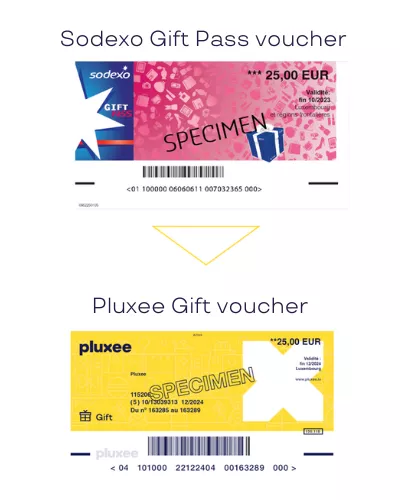
Once a voucher has passed its validity date, check what happens when a Pluxee voucher expires and whether any options are still available.
What happens if the voucher has expired?
For merchants only (and not for the beneficiaries of the vouchers) , vouchers can be reimbursed for two months after the date stated on the voucher in question. Vouchers can no longer be reimbursed once this two-month period has passed.
To receive payment for accepted vouchers, follow the steps explaining how to submit a Pluxee voucher for reimbursement.