
Find the answer to your questions, whether you're a company, an employee or a merchant!
How can we help you?
Google Pay: What should I do if my smartphone is lost or stolen?
If your device is lost or stolen, you can use the “ Find my mobile ” service to remotely deactivate Google Pay. Delete all payment cards stored in Google Pay.
What do Pluxee gift vouchers look like?
As a Pluxee Gift voucher merchant, you can automatically accept Pluxee AND Sodexo gift vouchers as long as they are still valid (see the expiry date on the vouchers).
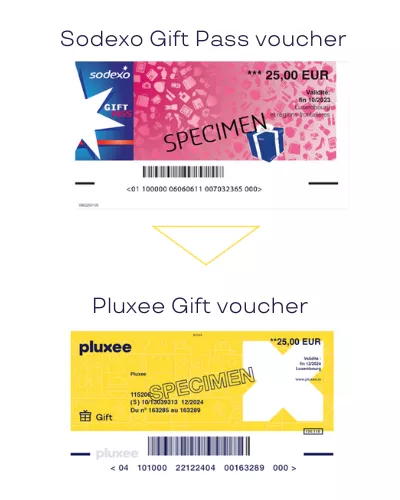
Once a voucher has passed its validity date, check what happens when a Pluxee voucher expires and whether any options are still available.
What happens if the voucher has expired?
For merchants only (and not for the beneficiaries of the vouchers) , vouchers can be reimbursed for two months after the date stated on the voucher in question. Vouchers can no longer be reimbursed once this two-month period has passed.
To receive payment for accepted vouchers, follow the steps explaining how to submit a Pluxee voucher for reimbursement.
Where can I pay with my Pluxee card via Google Pay?
You can use your Pluxee card with Google Pay at merchants belonging to the Pluxee acceptance network who display the “contactless” symbol on their payment terminal.
Follow the step-by-step instructions to add your Pluxee card to Google Pay.
How can I order a Pluxee Lunch card?
A Pluxee Lunch card in Luxembourg must be ordered by your employer. Employees cannot request the card directly from Pluxee.
Once the order has been placed, your employer will provide information about delivery, activation and access to your Pluxee Lunch benefits.
Check the daily spending limit for your Pluxee Lunch card in Luxembourg before making a purchase.
What's the difference between a classic Pluxee card and a virtual Pluxee card?
The “classic” Pluxee card works like a physical bank card, and can be used for contactless and mobile payments.
The virtual card is designed exclusively for mobile payments via Apple Pay or Google Pay. As with the physical card, you can pay in store or online with your lunch and gift vouchers and view your balance and transactions in the mobile application. Whether you opt for a virtual card contract, a physical card contract or both, our sales team will be happy to advise you!
What portion has to be paid by the employee? And by the employer?
Meal vouchers are exempt from social charges for employers and tax-free for employees. The table below summarizes the employer/employee share for vouchers with the maximum face value (€15):
|
€ |
With employee participation |
Without employee participation |
||
|
Employee |
Employer |
Employee |
Employer |
|
|
Quote-part |
2.8 (*) |
12.20 |
0 |
15.00 |
|
Taxation |
0 |
0 |
2,8 (**) |
0 |
|
Deductibility |
/ |
12.20 |
/ |
15.00 |
|
Social costs |
0 |
0 |
0 |
0 |
* Deducted from net salary$
** Added to gross taxable salary
How can I add my Pluxee card to Google Pay?
You can add your Pluxee card to Google Pay through Google Wallet in a few steps:
1. Open the Pluxee app.
2. Go to your card’s Settings.
3. Select “Add to Google Wallet.”
4. Choose the device on which you want to add the card, when more than one device is available.
5. Accept the terms and conditions.
After the first registration, repeat the steps above to add your Pluxee card to another device.
Need to turn off mobile payments? See how to deactivate Google Pay for your Pluxee card.
How can I reload my Pluxee Lunch card?
Your employer places an order with Pluxee. Your balance will be automatically updated on your mobile application or on the Consumers Page Pluxee.
Need to know whether your balance has been updated? See how to check when your Pluxee card has been reloaded.
How can I activate my Pluxee card?
To activate your card, you must have created an account using your Pluxee ID and Card ID in the Pluxee app (by Pluxee International). Before activating your card, make sure you have it in your possession if it is a physical card. If it is a virtual card, it can be activated after creating your account using the login details received by email (Pluxee ID and Card ID).
When you receive your card, it is inactive. You can activate it through the Pluxee application (or via the Consumers Page) by going to WALLET at the bottom of the screen, then Settings in the top right-hand corner. Click on the “Activate this card” button.
In the event of card renewal: As soon as the new card is ordered, i.e. 1 month before the previous one expires, it immediately replaces the old one in the Pluxee application. It will be sent within 10 to 15 working days to your employer's address. Please do not click on “Activate” in the application until you have your new card in hand, so that you can continue to use your current card and avoid any potential risks.
Cardholders without access to the Pluxee application can activate their card also on the Consumer Page.
If none of the above 2 activation options are available, you can request activation from the Pluxee customer service department: by e-mail on consumers.lu@pluxeegroup.com or by telephone on 00352 28 76 15 00 Monday to Friday, 9am to 5.30pm. Please provide us with your Pluxee ID and Card ID.
Lost your card? Follow the steps to block your Pluxee card in Luxembourg and keep your account secure.